GPU Architecture: Connecting Hardware Components with CUDA Concepts
Why Care About GPU Architecture?
In our daily life, we hear a lot about GPUs. I even see some people who use frameworks that utilize GPUs efficiently, yet they think of the GPU as a black box: you give it something and the result appears. To complete the Session 4 assignment in the Al-Khawarizmi Tour 2026 Online HPC & AI Hackathon I had to learn CUDA. As a physics student, I first needed the full picture of the GPU or "the system". Or at least the basic architecture. Below is a basic GPU diagram labeling its main components, such as the GPU chip, VRAM, and power connectors.
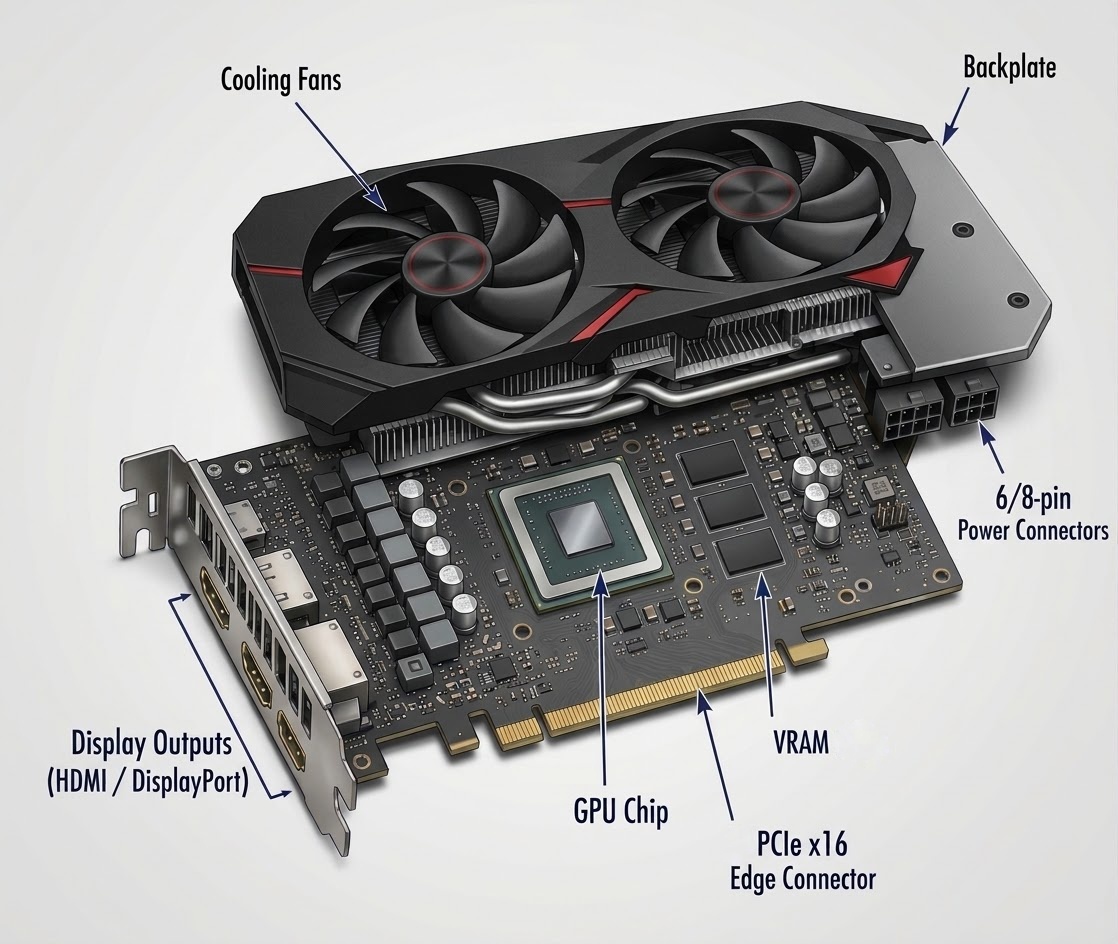
Image generated using Google Gemini AI 3.0
I'll use the NVIDIA A100, based on the Ampere architecture, as an example because it became an important accelerator for modern deep learning and high-performance computing. I'm not going to list cache sizes and bandwidth numbers. Instead, I want you to see the architecture — to understand the physical structure from the top level all the way down to the individual cores.
GPU Chip
When we hear about GPU, we hear some number about transistor. The presentor talks about this component, the GPU chip, which contains tens or hundreds of billions of transistors. This is where the GPU's computation takes place (This 'computation takes place" term will come again, remember that). A100 is the GPU name, where GA100 is the chip name, which was made in TSMC. Let's zoom in on the chip.
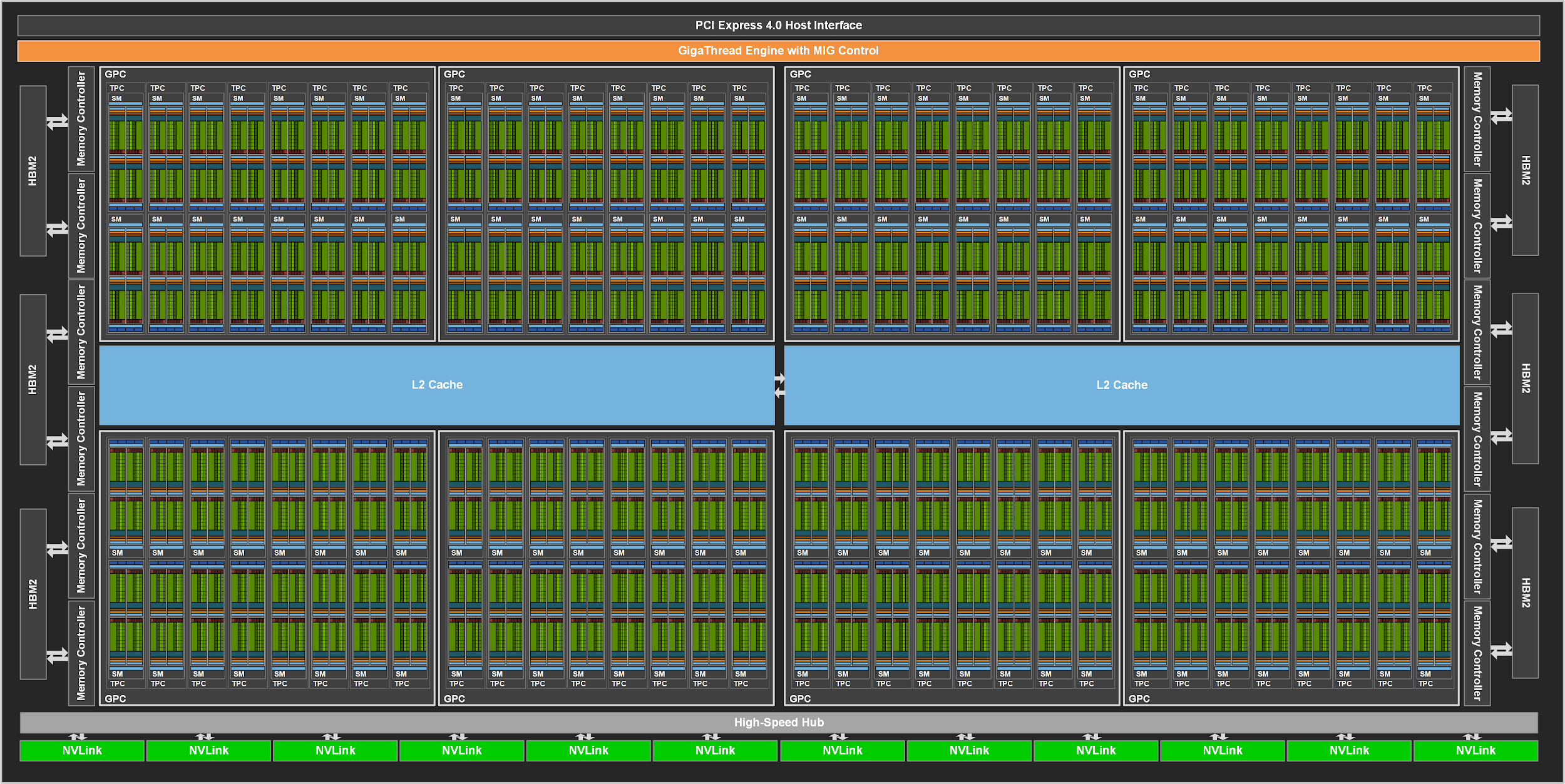
Image source: NVIDIA Developer Blog
To organize computation and data handling, GPU manufacturers arrange processing hardware in a hierarchy. I want you to look at this image very carefully. I suggest opening it in a new tab and zooming in to find the labels "GPC", "TPC", and "SM".
Let me break down the hierarchy:
GPU — the complete GPU chip
GPC (Graphics Processing Cluster) — a major processing cluster
TPC (Texture Processing Cluster) — contains two SMs in GA100
SM (Streaming Multiprocessor) — schedules and executes thread blocks
Processing units — include CUDA cores, Tensor Cores, and other execution units
So the chip is hierarchical: big groups contain smaller groups, which contain even smaller groups. For now, focus on the Streaming Multiprocessor and leave the other components aside. Understanding how SMs are organized will help you write more efficient CUDA code. The full GA100 architecture supports up to 128 SMs. The NVIDIA A100, however, has 108 enabled SMs.
Inside One Streaming Multiprocessor
Each SM is the fundamental unit of computation. When your CUDA program runs, work gets assigned to SMs. Let's look inside one:
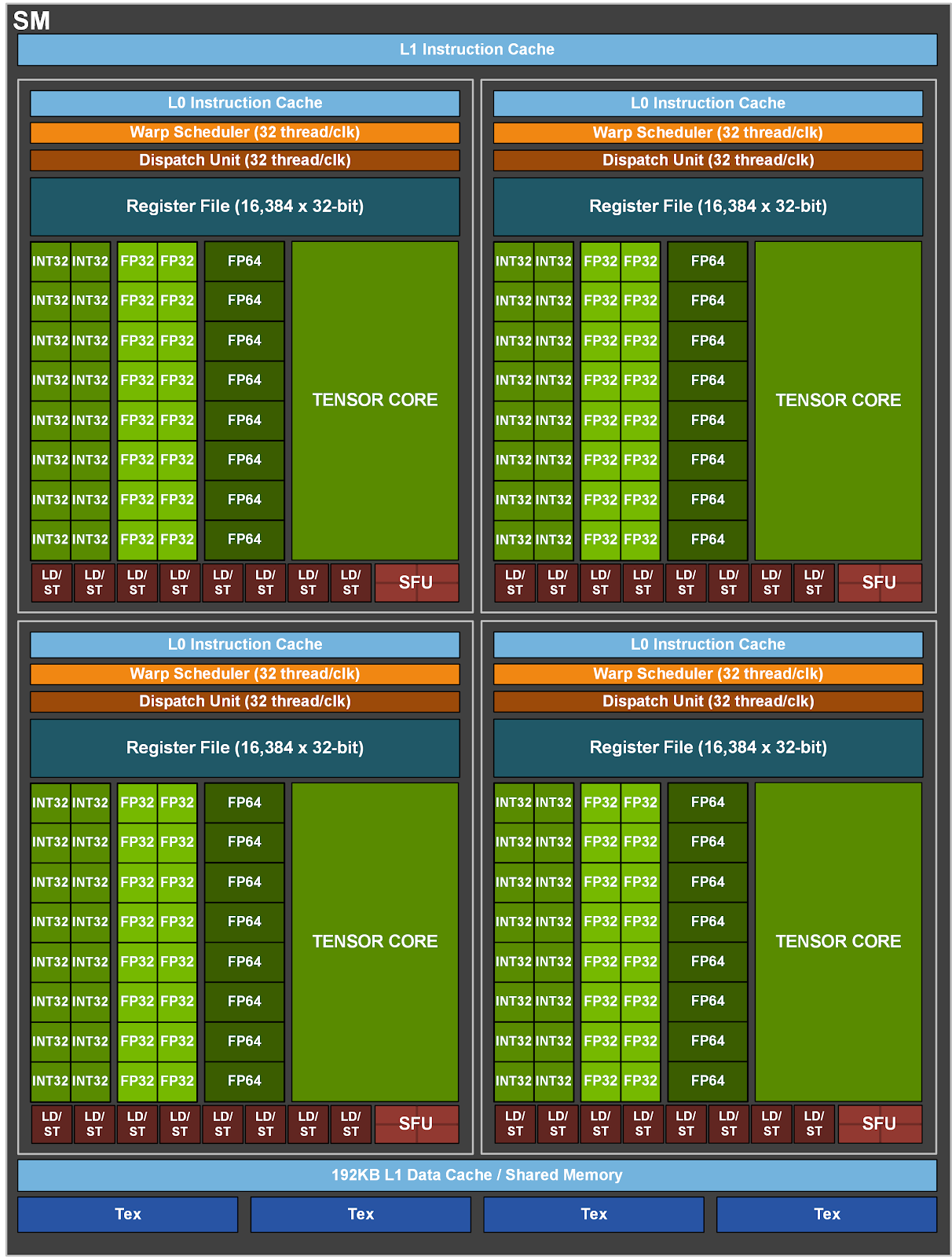
Image source: NVIDIA Developer Blog
Each processing block has:
- Its own warp scheduler — decides which group of 32 threads runs next
- CUDA cores — the workhorses for standard math (FP32, INT32)
- A Tensor Core — specialized hardware for matrix multiply-accumulate, the operation that dominates deep learning
- Access to a register file — ultra-fast, private storage for each thread
The SM contains an L1 cache and shared-memory subsystem. Shared memory provides a fast workspace that threads within the same thread block can use to exchange data and cooperate.
CUDA programming help: The Two Layers of 3D Thinking
Here is the part that trips people up when they start CUDA programming, and the part that, once you get it, everything clicks. Before looking at the CUDA code, let's connect the physical GPU components we just explored with the terms used in CUDA programming.
- Thread: The smallest unit of execution in a CUDA kernel. Threads execute instructions on processing units such as CUDA cores.
- Warp: A group of 32 threads that execute together. The warp scheduler inside an SM selects ready warps for execution.
- Block (Thread Block): A group of threads organized to cooperate and share resources such as shared memory. CUDA schedules each block onto an SM.
- SM (Streaming Multiprocessor): A physical processing unit inside the GPU. It executes the blocks assigned to it using its available processing units and warp schedulers.
- Grid: The complete collection of thread blocks launched by a CUDA kernel.
Think of the relationship this way: the SM is the physical hardware, while blocks, threads, and warps describe how CUDA organizes and schedules computation on that hardware. A block is not an SM, and a thread is not a CUDA core.
Now, when you write a CUDA kernel, you organize your work into two coordinate systems — both can have up to three dimensions. First, consider the following CUDA code:
dim3 grid(grid_x, grid_y, grid_z);
dim3 threads(thread_x, thread_y, thread_z);

kernel<<<grid, threads>>>(args);
Here, we specify two launch parameters: the grid dimensions and the number of threads in each block. Let's understand what these two represent in the GPU.
First 3D: Where is my block inside the grid?
The first parameter, grid, specifies the dimensions of the grid of thread blocks .
Suppose you specify dim3 grid(3,2,3). This creates a grid containing 18 thread blocks. The GPU scheduler distributes these blocks across available SMs. An SM can execute multiple blocks, depending on available resources, while other blocks may wait for their turn.
The grid coordinates identify a block within the grid, not its physical location on the GPU.
Second 3D: Where is my thread inside that block?
Inside each block, you have threads — and this is another 3D coordinate space. Threads execute on the processing units inside an SM. The warp schedulers manage their execution in groups called warps. Thread coordinates identify a thread within its block. The SM's warp schedulers manage the execution of warps on the available processing units.
blockIdx (which block am I?) and threadIdx (which thread inside that block am I?).
Putting Both Layers Together
Here is the complete picture — both levels of the hierarchy in one view:
blockIdx = your district address (which block in the grid)threadIdx = your house address within the district (which thread in the block)globalThreadId = your complete address within the overall thread arrangement
References
- NVIDIA Ampere Architecture In-Depth — the official NVIDIA deep-dive blog post on A100.
- CUDA C++ Programming Guide — NVIDIA's reference for understanding grids, blocks, and threads.
- nvidia-ampere-architecture-whitepaper.pdf — Read this pdf for further information.